


Self-service: your IT in one place
Log and track tickets, approve changes, order workstations, view invoices and manage your Microsoft 365 environment yourself. In the customer portal and in the Interforce app, whenever it suits you.
Fewer calls, more overview
The customer portal is your digital gateway to everything you have purchased from Interforce. You can see what is going on, take care of whatever you can handle yourself, and see exactly where everything else stands. On your computer in the browser, and on the go in the Interforce app.
Sample view, figures for illustration only.
Always in the picture
Tickets, incidents, invoices, contracts and your IT environment are available to you 24/7.
Sorted straight away
Resetting a password, onboarding a colleague or assigning a licence takes just a few clicks. Changes go through in Microsoft 365 immediately.
Demonstrable service
See in black and white how quickly your tickets were picked up and resolved, measured against the agreements in your SLA.
Four areas, one overview
You decide who sees what. For each colleague you switch on exactly the sections that match their role: the finance department sees the invoices, the IT manager manages the users.
Overview
Service status, what is waiting for you, open tickets, outstanding invoices, current services and your account manager.
Service desk
Tickets, changes awaiting approval, incidents and maintenance, support settings and reports.
Administration
Invoices, quotes with online approval, ordering workstations, subscriptions and contracts, calls and meeting notes.
IT management
Self-service for Microsoft 365, Active Directory, firewalls, DNS and domain names.
Service desk: report, track and have your say
Every ticket is one continuous conversation with our service desk. You can see live who is working on it, when you can expect a response and what is still waiting for you.
- Tickets with attachments; simply paste a screenshot with Ctrl+V. The assigned engineer and SLA status are shown at the top of every ticket.
- Changes awaiting approval: approve or reject with one click, with a short explanation.
- Incidents and maintenance affecting your environment, with updates per notice.
- Support settings: decide who may request support on behalf of your organisation and who is automatically kept in copy.
Sample view.
Sample view, figures for illustration only.
Reports: our service, measured and visible
Not a gut feeling, but figures. Per month, per quarter or for the last twelve months, as a PDF for the management meeting or as a CSV for your own analyses.
- SLA: response and resolution times by priority, type, location or reporter. Time spent waiting on you or a third party is fairly deducted.
- Changes: approved, rejected or expired, and what is still awaiting your decision.
- Interruptions: all incidents and maintenance with start, end and duration.
- Licences: purchased, in use, and which licences could potentially be freed up.
- Hours: the hours within your contract, per ticket and per contract.
Administration and ordering
No more searching your mailbox for that one invoice. Everything is neatly in one place and can be downloaded as a PDF straight away.
Invoices
All your invoices in one list, with the status open or paid.
Quotes with online approval
Review quotes line by line, ask questions by adding a comment and approve with one click. You decide who may give binding approval.
Subscriptions and contracts
Your ongoing services with quantities, term and price, also per location.
Phone calls
Telephony with us? Search the calls on your lines by number, direction and date.
Meeting notes
The summaries of our meetings and visits that have been shared with you.
Digital signing
Sign contracts online via a personal link. No printer or scanner needed.

A complete workstation, configured by you
We prepare sets for you, such as a complete workstation. You choose the variants and options, order for your colleagues at your own agreed prices and track the delivery in the portal.
- 1Choose a set
- 2Configure
- 3Check out
- 4We deliver
IT management: in your own hands
You handle the day-to-day tasks yourself, directly in Microsoft 365. Every change is logged, so you can always see who did what. The complex work stays with us.
Users
Set a new password, disable or enable an account, and onboard or offboard colleagues in a matter of minutes.
Licences
See what you have, what is in use and what is available, and assign or revoke licences per user.
Mailboxes and groups
Create a shared mailbox such as info@ yourself and manage the members of your Teams and Microsoft 365 groups.
Devices
Laptops, computers and phones with user, operating system and last contact.
DNS and domain names
Edit records yourself (critical records are protected) and request or transfer new domain names.
Cloud AD and firewalls
Enable or disable users in your own Active Directory, and keep an eye on the status of your Sophos firewalls.
Everything in the Interforce app too
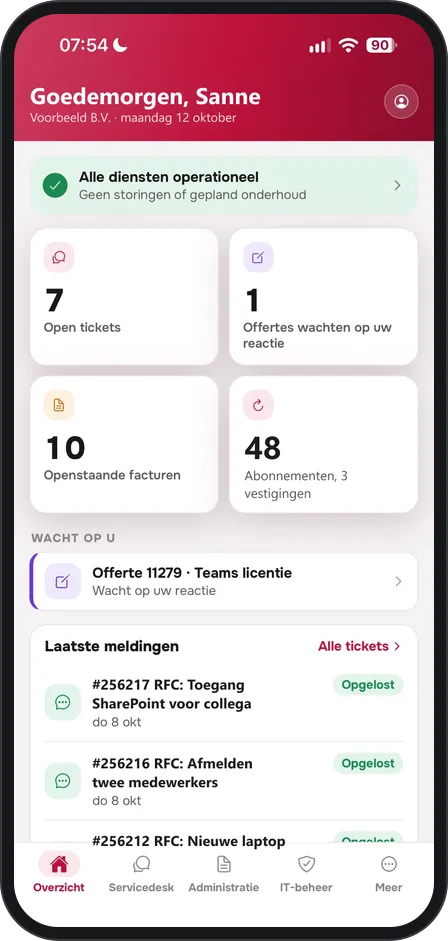
The Interforce app brings the customer portal to your phone. Report an incident with a photo, track your tickets, approve a change or quickly look up an invoice, wherever you are. You can sign in with your portal account or with your own Microsoft 365 work account.


Securely set up, with you in control
Two-factor authentication
Sign in with a password plus a code from an authenticator app, or with your Microsoft 365 work account.
Permissions per colleague
More than thirty individual permissions in clear groups. Anything that costs money or is binding is a separate permission.
Everything logged
Every action in your IT environment is logged: who did what, and when.
Get started in three steps
There is nothing to install: the portal works in the browser, on your computer, tablet and phone.
- 1
Introduction
Together we decide which sections are useful and who gets access.
- 2
Setup
We connect your environment and set up the permissions for each colleague.
- 3
Invitation
Your colleagues receive a personal invitation and can get started right away.
At a glance
- Log tickets and track them live, with SLA status
- Approve changes with one click
- Incidents and maintenance visible immediately
- SLA, licence, hours and change reports
- Invoices, contracts and quotes with online approval
- Order workstations at your own prices
- Microsoft 365: users, licences, mailboxes, groups
- Manage DNS records and domain names yourself
- Two-factor authentication and sign-in with Microsoft
Which sections are available depends on the services you purchase from us and on each user's permissions.
Curious what the portal looks like for your organisation?
We would be happy to show you in a short demonstration.